Tuesday, September 14, 2010
Halo Reach Is Out... Why Don't You Have It Yet?
Yes Halo Reach is officially out on game shelves everywhere... maybe. With the popularity of the Halo series don't be surprised if you can't get one. Halo has is one of the best multiplayer games out, and one of the main reasons Xbox 360 is leading sales today. Halo Reach is a prequel in the Halo series. So finally we get some back story to the game. So if your not already online trying to level up smelling of a overnight gaming binge than your missing the action, or you don't have it. I'll admit I'm slipping because I don't have my copy yet. Pay day isn't till Friday. Read full review here!


Rockband 3 Sounds Awesome - Pro Mode With Real Instuments
I'm a big fan of the Rockband franchise. Whatever style of music is your favorite its fun to get with some friends grab the instruments and wildout. Now they have a new instrument in a keyboard, and a new Pro Mode where you learn to play for real! Check out the full article. I know I'm gonna play it.
Court Ruling Could Make It Illegal to Sell Your Own Games
Court ruling could make it illegal to sell your own games. This would effect company's such as Gamestop in a major way. It may also effect the cost of used games. Some publisher's are charging a extra 10 bucks to use online modes for the game if you didn't register the product first. This all comes from the fact that the publisher doesn't get a dime of that second sell. Click here to read story.
Is Xbox 360 the best online gaming experience
Is Xbox 360 the best online gaming experience? Who has the best online experience? I believe its Xbox live. Yes you pay for it, but you do get what you pay for, Netflix,Facebook,Twitter,Zune, and coming soon ESPN. No other online system can match it. Come argue your opinion right now!
3 Tools You Must Have to Backup Xbox 360 Games
If your going to backup games to play on your Xbox 360 there are 3 things you have to have to accomplish this. All of these are very important and you can't accomplish this without it. Well there are always around something, but if you want to get the job done right this is how to do it. For more click here
Thursday, September 9, 2010
Xbox 360 Kinect 250GB Bundle
http://Adamprince1981.everything4eve.click2sell.eu
Xbox 360 Kinect will be releasing a 250GB bundle. This will have the new Xbox 360 slim 250GB and Kinect. My opinion this should have been the first one released. I'm all about memory, I won't the movies and games downloaded strait to my Xbox 360 as much as possible, and 4GB just isn't that mush memory for that demand. Check out the article its a great read.Click here now
Download your games now
Wednesday, September 8, 2010
How to Fix Wireless Adapter for Xbox 360
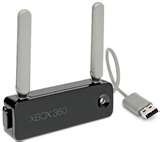
1. Turn off your Xbox 360 console and unplug your Xbox 360 wireless adapter from the console. Plug your Xbox 360 wireless adapter back in the back on your console and turn it back on. If I still don’t light up to indicate that it’s on got to step 2.
2. Now plug your Xbox 360 wireless adapter in the front of the console. (USB Ports on front panel)If it doesn’t work in either port try step 3.
3. Turn off your Xbox 360 console, and unplug your Xbox 360 wireless adapter from the back.
4. Turn your console back on and press the button in the middle of your Xbox 360 controller.
5. Scroll over to Settings and select System settings
6. Select Network Settings. You should see a screen showing your connection to Xbox Live. Select Configure Network.
7. In Configure Network scroll over to Additional settings, and select Restore to Factory Defaults at the bottom. It should ask you are sure you want to do this. Select yes.
8. Turn off your console. Plug back in your Xbox 360 wireless adapter in the back of your Xbox 360.
9. Turn console back on and check the light on your Xbox 360 wireless adapter
If your light comes on your issue with your Xbox 360 wireless adapter is solved. If it doesn’t your wireless adapter may need to be replaced. This can be done at Xbox.com. The process would be the same for both version of the wireless adapter.
Subscribe to:
Posts (Atom)