Showing posts with label Xbox 360. Show all posts

Thursday, September 9, 2010

Xbox 360 Kinect 250GB Bundle

http://Adamprince1981.everything4eve.click2sell.eu

Xbox 360 Kinect will be releasing a 250GB bundle. This will have the new Xbox 360 slim 250GB and Kinect. My opinion this should have been the first one released. I'm all about memory, I won't the movies and games downloaded strait to my Xbox 360 as much as possible, and 4GB just isn't that mush memory for that demand. Check out the article its a great read.Click here now

Download your games now

Wednesday, September 8, 2010

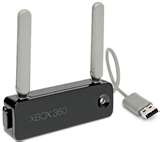
How to Fix Wireless Adapter for Xbox 360

Here are some very easy steps to get your Xbox 360 adapter light to come so it will connect. This is very easy to do and wouldn’t take much of your time at all
1. Turn off your Xbox 360 console and unplug your Xbox 360 wireless adapter from the console. Plug your Xbox 360 wireless adapter back in the back on your console and turn it back on. If I still don’t light up to indicate that it’s on got to step 2.
2. Now plug your Xbox 360 wireless adapter in the front of the console. (USB Ports on front panel)If it doesn’t work in either port try step 3.
3. Turn off your Xbox 360 console, and unplug your Xbox 360 wireless adapter from the back.
4. Turn your console back on and press the button in the middle of your Xbox 360 controller.
5. Scroll over to Settings and select System settings
6. Select Network Settings. You should see a screen showing your connection to Xbox Live. Select Configure Network.
7. In Configure Network scroll over to Additional settings, and select Restore to Factory Defaults at the bottom. It should ask you are sure you want to do this. Select yes.
8. Turn off your console. Plug back in your Xbox 360 wireless adapter in the back of your Xbox 360.
9. Turn console back on and check the light on your Xbox 360 wireless adapter
If your light comes on your issue with your Xbox 360 wireless adapter is solved. If it doesn’t your wireless adapter may need to be replaced. This can be done at Xbox.com. The process would be the same for both version of the wireless adapter.

Monday, September 6, 2010

Install an Xbox 360 Controller on Your PC

Did you know that you can install your Xbox 360 controller to your PC? This can be done fairly easy with a little bit of time on your part. All you need is a wired Xbox 360 controller, a computer with windows, and the internet. Now I’ll let you in on the 3 steps to do this process.
1. First go to Microsoft.com and download the gaming software it’s completely free. You’ll need to do this so your controller will work on Windows computer. Select “Controller”, than Xbox 360 Controller for Windows, and finally your computers operating system and language. If you don’t know what you operating system is it can be found by going to “My Computer” icon and then click “Properties”.
2. Now start the file download by double clicking it. Once it downloads Windows will walk you through the process. This should be done in no time at all.
3. Plug your Xbox 360 controller into the USB port on your computer. My preference would be the USB port on the front of the computer if you have it for easy access. It doesn’t matter which one you use though they all work the same. Your Xbox 360 controller should light up when recognized by your computer.
That’s It! You’re good to go! Now its time to play your favorite computer games using your Xbox 360 .

Info provided by Xbox.com